
AI can make sales teams faster. It can summarize accounts, suggest follow-ups, prioritize leads, and improve pipeline visibility. However, AI only works well when it learns from reliable customer data. If CRM data is incomplete, duplicated, outdated, or poorly structured, AI does not fix the sales process. It scales the same mistakes faster.
That is why AI sales operations now depends on CRM quality. Sales automation needs clean customer records, clear pipeline stages, structured follow-up rules, and connected business data. For sales leaders, the real question is not whether AI can support sales. The better question is whether the CRM gives AI the right context to work with.
What is AI sales operations?
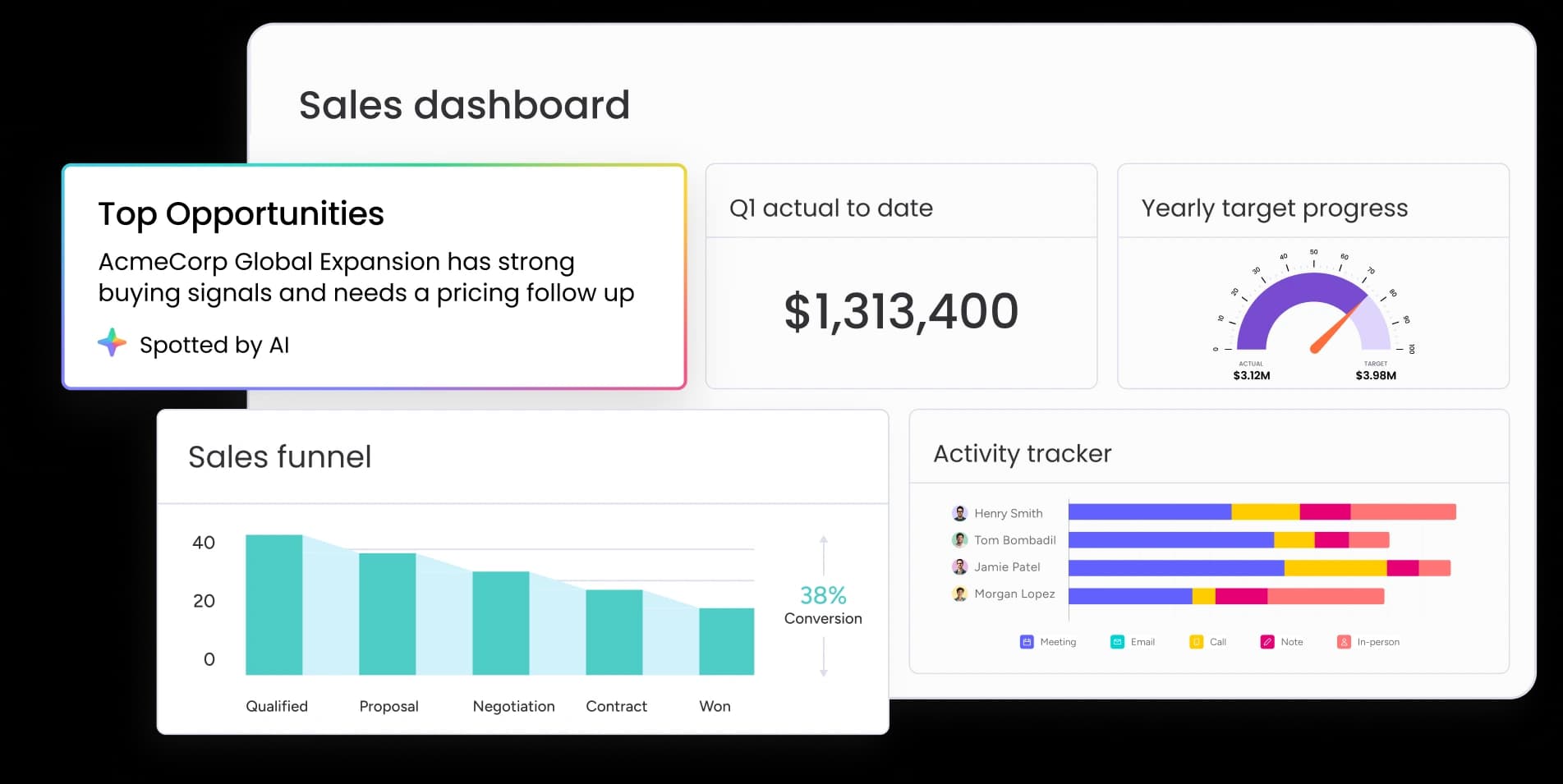
AI sales operations can help teams identify top opportunities, track pipeline progress, and monitor sales activity when CRM data is structured clearly. (Source: Monday.com)
AI sales operations is the use of AI to improve sales workflows, CRM management, lead prioritization, customer follow-ups, pipeline visibility, and sales decision-making.
In practice, this can include:
AI-generated account summaries
Lead scoring and prioritization
Follow-up reminders
CRM update suggestions
Pipeline risk alerts
Sales forecasting support
Customer context retrieval before calls
The value is clear. Sales reps spend less time searching for information. Managers see pipeline risks earlier. Revenue teams can act on customer signals faster.
However, this only works when CRM data is complete and accurate.
Salesforce’s 2026 sales statistics report says 74% of sales teams using AI are prioritizing data hygiene to support it. It also says 51% of sales leaders using AI report that tech silos delay or limit AI initiatives. (Salesforce)
This matters because AI sales automation is not magic. AI cannot understand a customer relationship if the data is split across CRM notes, spreadsheets, inboxes, chat messages, and outdated pipeline records. It needs structured context.
Why bad CRM data breaks AI sales automation
Bad CRM data has always hurt sales operations. With AI, the damage becomes bigger.
A sales rep may notice when a CRM field looks wrong. An AI system may not. It may treat the wrong field as truth and use it to generate a follow-up, qualify a lead, or forecast a deal.
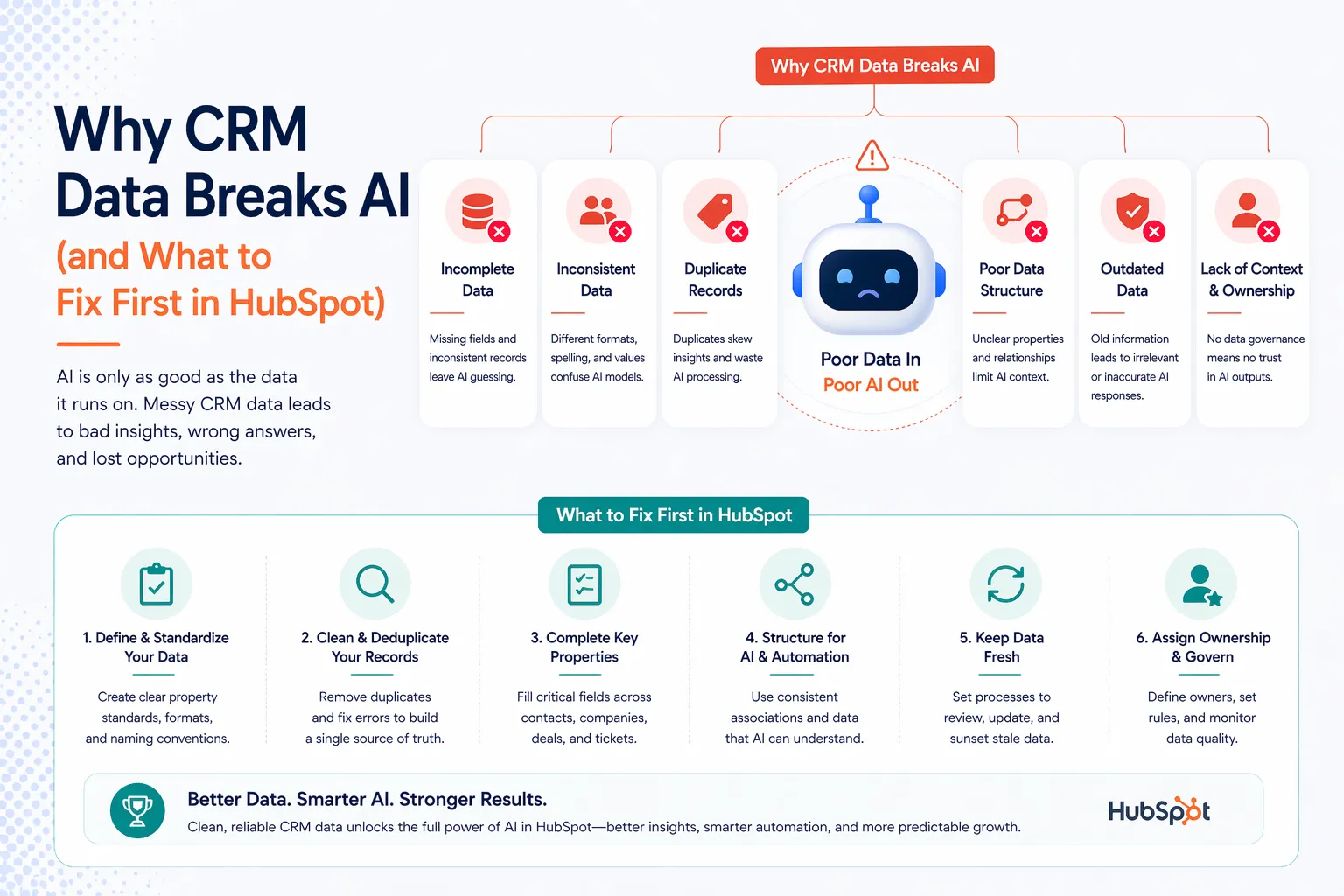
Incomplete, inconsistent, duplicated, outdated, and poorly structured CRM data can weaken AI sales automation and lead to unreliable outputs. (Source: Fast Slow Motion)
This is where CRM automation AI becomes risky. It saves time when the data is clean. However, it creates confusion when the CRM is messy.
Bad CRM data usually appears in four ways.
1. Incomplete customer records
A lead may miss key fields such as company size, industry, buying role, last contact date, or deal source.
As a result, AI has limited context. It may recommend a generic follow-up or misread the opportunity.
2. Duplicate accounts
The same company may appear several times in the CRM.
One record may show an active deal. Another may show an old conversation. A third may show no recent activity.
AI may treat these records as separate customers. That can lead to inconsistent summaries and wrong recommendations.
3. Outdated pipeline stages
A deal may still be marked as “proposal sent,” even when the prospect has gone silent. Another opportunity may appear active, even though the main contact has changed roles.
In both cases, AI may prioritize the wrong deal because the CRM no longer reflects reality.
4. Unstructured sales notes
Sales notes often contain useful context. However, reps do not always write notes in the same way.
One rep may write clear next steps. Another may write short notes that are hard to interpret.
AI can summarize what exists. But it cannot recover context that was never captured.
Poor data quality is already affecting AI outcomes across businesses. Salesforce research reported by TechRadar found that 76% of business leaders feel pressure to deliver value with data, while incomplete, outdated, or low-quality data prevents many companies from doing so (Salesforce). The same report said 84% agree their data strategies need a complete overhaul to succeed with AI. (Result Sense)
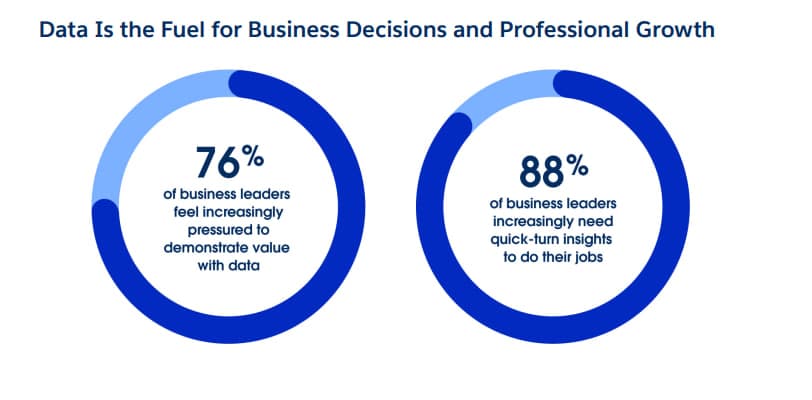
76% of business leaders feel pressure to demonstrate value with data, while 88% need quick-turn insights to do their jobs. (Source: Salesforce)
For sales teams, this creates a clear risk. If AI learns from weak CRM data, it may produce outputs that look polished but lead to poor decisions.
How bad CRM data affects the sales workflow
AI sales tools often promise faster workflows. They can write follow-ups, score leads, summarize accounts, and highlight stuck deals.
However, every use case depends on CRM structure.
If the CRM is messy, AI may move faster in the wrong direction.
1. Follow-up automation becomes generic
Follow-up automation works best when AI knows the customer’s stage, pain point, last conversation, decision-maker, and next step.
If the CRM only shows a name, company, and old activity date, AI has very little to use.
The message may sound professional. However, it will not feel specific.
Worse, it may refer to the wrong stage or suggest a next step that does not match the customer’s real situation.
This is why sales workflow AI should not start with message generation. It should start with customer context.
Before AI writes the next email, the system needs to know what happened before, what the customer cares about, and what action makes sense now.
2. Lead management becomes misleading
AI lead management often depends on scoring and prioritization.
AI can help sales teams identify which leads need attention. It can also flag accounts that look likely to convert.
However, this only works when lead data is reliable.
A lead may look low priority because key fields are missing. Another may look high priority because old engagement data was never updated.
Duplicate records can also split important signals across several accounts.
As a result, the sales team does not get better prioritization. It gets faster misprioritization.
For example, a manager may ask AI to show high-value leads that need follow-up this week. If the CRM does not capture deal stage, last touchpoint, buying intent, or ownership correctly, the list may miss the right accounts.
3. Pipeline visibility becomes less reliable
Sales leaders need accurate pipeline visibility. They need to know which deals are moving, which deals are stuck, and which reps need support.
AI can help summarize pipeline movement. However, it cannot fix inconsistent pipeline data on its own.
If reps use stages differently, AI will read the pipeline incorrectly.
For example, one rep may mark a deal as “qualified” after a first call. Another may use the same stage only after budget confirmation.
To AI, both deals look similar. In reality, they are very different.
Salesforce reports that sales teams without an all-in-one platform use an average of eight tools per team, which creates the risk of tech bloat. The same report says nearly half of sellers feel overwhelmed by too many tools. (Salesforce)
This matters because scattered tools create scattered customer context. When sales data lives across too many systems, AI may only see part of the customer journey.
The output then becomes incomplete, even if the AI model is strong.
What businesses should fix before using AI in sales
AI sales operations should not begin with another AI tool. It should begin with a cleaner sales process.
Before scaling AI, businesses should fix five foundations.
1. Clean CRM records
Customer records should be complete, updated, and deduplicated.
At minimum, the CRM should capture company information, contact roles, deal stage, next step, owner, last touchpoint, and key customer context.
2. Clear pipeline stages
Sales teams need shared definitions for each pipeline stage.
For example, “qualified” should mean the same thing for every rep. Otherwise, AI cannot read the pipeline consistently.
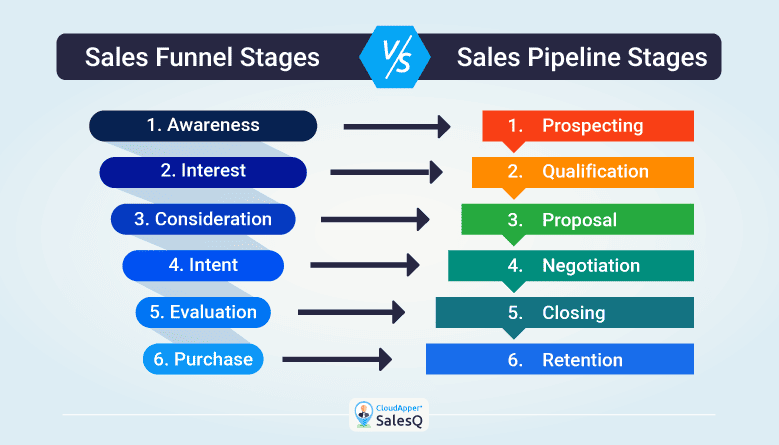
Clear sales pipeline stages help AI read deal progress more consistently and support better sales workflow automation. (Source: CloudApper SalesQ)
3. Structured follow-up rules
AI needs to know what should happen next.
For example, a deal in proposal stage may need a follow-up within three business days. A cold lead may need a different rule. A high-value opportunity may need manager visibility.
These rules help AI recommend actions that match the sales process.
4. Connected customer context
CRM data should not sit alone.
In many companies, useful customer context also lives in finance, support, product usage, contracts, and internal operations.
When these systems connect, AI can give better recommendations.
5. Reviewable AI outputs
AI should not act as a black box.
Sales teams should be able to see what data AI used, why it made a recommendation, and whether a rep accepted, edited, or rejected the output.
This creates a feedback loop. Over time, the sales operation becomes easier to improve.
What good AI sales operations should look like
A strong AI sales operation does not replace the sales team. It gives the team better context and reduces manual work.
The first layer is CRM data quality. Customer records need to be accurate, complete, and easy to use.
The second layer is workflow structure. Pipeline stages, follow-up rules, ownership, and handoff points should be clear.
The third layer is system integration. Sales data should connect with the business systems that shape customer decisions.
After that, AI can add value.
For example, AI can summarize a customer before a call. It can flag deals with no next step. It can suggest follow-ups based on real customer context. It can also help managers see pipeline risks earlier.
This is where AI becomes useful. It does not guess from weak CRM records. It works from a structured sales workflow.
Salesforce positions its AI CRM around unified AI, data, and applications that help humans and agents work together across business functions.
That direction shows where sales technology is moving. AI is no longer just a writing assistant. It is becoming part of the operating layer where teams manage customers, workflows, and business data.
How Twendee helps build cleaner AI sales operations
Twendee helps businesses build CRM workflows and sales automation systems connected to business data.
The goal is not to add AI on top of a messy CRM. The goal is to create a cleaner sales operation where AI can support real work.
For example, Twendee can help structure pipeline stages, follow-up rules, customer context fields, lead ownership, and reporting workflows.
This gives sales teams a more consistent process before automation is added.
Twendee can also integrate AI into sales operations for customer context, follow-ups, and pipeline visibility.
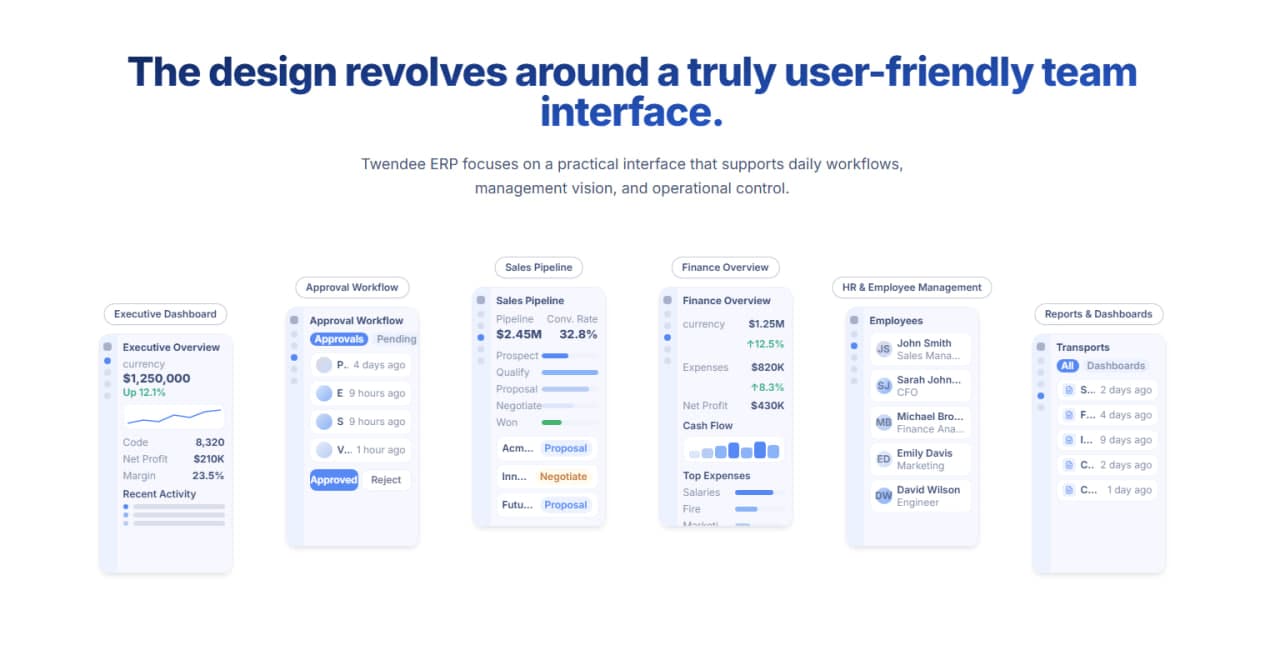
Twendee ERP is designed around practical screens for sales pipeline, approvals, finance, reporting, and management visibility, helping teams connect daily work with cleaner business data (Source: Twendee ERP).
A sales rep could ask an AI assistant for a customer summary before a call. A manager could review which deals have no follow-up scheduled. A team lead could see which opportunities are stuck because key information is missing.
This works best when CRM data connects with ERP, finance, customer support, and internal operations where needed. For growing businesses, this is often the practical path. Instead of buying another disconnected AI tool, they can first clean up the sales workflow, connect the right data, and then use AI where it creates real operational value.
Conclusion
AI can make sales teams faster. However, it cannot make bad CRM data reliable. When customer records are incomplete, duplicated, outdated, or poorly structured, AI sales automation can create confident but misleading outputs. Strong AI sales operations starts with clean CRM data, clear pipeline stages, structured follow-up rules, and connected customer context.
Twendee helps businesses build CRM workflows and sales automation systems connected to business data. By structuring pipeline logic, customer context, follow-up workflows, and AI integration, Twendee helps sales teams move from scattered CRM activity to a cleaner sales operation that is easier to automate, monitor, and improve.
Book a call: Calendly
Read latest blog: AI Workloads Are Breaking Old Cloud Cost Planning