AI infrastructure is changing cloud planning again. Enterprises now have more options across hyperscalers, specialized GPU clouds, private infrastructure, edge environments, and on-premise systems. That gives technology leaders more flexibility, but it also makes cloud decisions harder.
A workload that looks efficient on one provider today may become expensive, constrained, or difficult to move later. Data may need to stay in a specific region. AI models may require different compute profiles across training, fine-tuning, inference, monitoring, and integration.
This is why multi-cloud strategy is returning to the enterprise cloud agenda. The goal is no longer to use multiple providers for the sake of choice. The goal is to keep important workloads flexible enough to support cost control, resilience, compliance, and long-term architecture decisions.
AI Is Changing What Enterprises Need From Cloud Infrastructure
For years, enterprise cloud strategy was often built around migration, scalability, and cost optimization. Companies moved workloads to the cloud to reduce infrastructure burden, improve flexibility, and modernize legacy systems.
AI adds a different set of pressures.
AI workloads can be compute-heavy, data-intensive, and sensitive to latency. Some workloads need high-performance GPUs. Some need to sit close to enterprise data. Some involve sensitive customer or operational information that cannot move freely across regions. Others may need to run across different environments because availability, pricing, or business requirements change over time.
Gartner forecasts worldwide public cloud end-user spending to reach $723.4 billion in 2025, up from $595.7 billion in 2024. The same Gartner forecast also predicts that 90% of organizations will adopt a hybrid cloud approach through 2027, while data synchronization across hybrid cloud environments becomes one of the urgent GenAI challenges enterprises need to address.
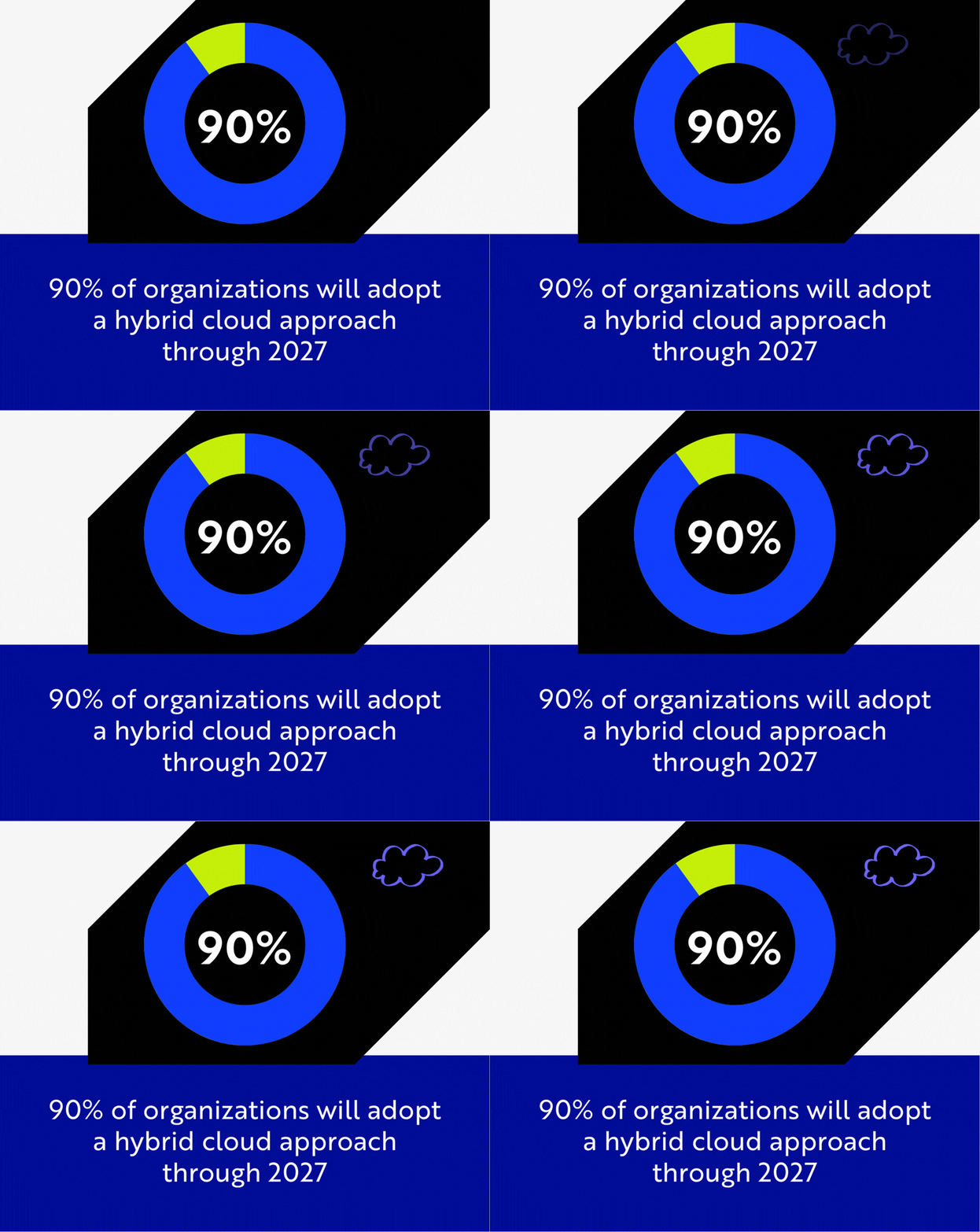
Gartner forecasts that 90% of organizations will adopt a hybrid cloud approach through 2027 as cloud and AI infrastructure planning become more complex. (Source: Gartner)
That matters because AI does not sit neatly inside one infrastructure layer. A company may use one cloud for customer-facing applications, another for analytics, a private environment for sensitive data, and specialized infrastructure for model workloads. As these choices expand, cloud planning becomes less about where the company hosts applications and more about how workloads, data, and systems stay connected.
A strong enterprise cloud strategy now needs to answer questions such as:
Can this workload move if pricing changes? Can data stay where regulation requires it to stay? Can the business recover if one provider has an outage or capacity constraint? Can AI services connect safely with existing applications and data pipelines?
These questions explain why multi-cloud is becoming relevant again.
Multi-Cloud Is Becoming a Workload Placement Decision
A practical multi-cloud strategy does not mean every workload should run everywhere. That approach can create unnecessary complexity and cost.
The better question is: which workload belongs where?
Some systems are stable, predictable, and deeply tied to existing infrastructure. They may stay on one cloud or private environment because moving them brings little benefit. Other workloads need more flexibility. AI inference, analytics pipelines, customer-facing services, compliance-sensitive data, and high-availability applications may require more careful placement.
This is where multi-cloud architecture becomes a business decision, not only a technical one.
For example, an enterprise may keep sensitive customer records in a controlled environment while running AI-powered search or recommendation services on a public cloud. It may use one provider for core applications, another for data and analytics, and a specialized infrastructure partner for GPU-heavy workloads. It may also keep some workloads portable so the company can respond to changes in cost, regulation, availability, or performance.
Flexera’s 2025 State of the Cloud reporting shows how central cloud cost and workload planning have become. Its 2025 report highlights that organizations are increasing FinOps activity, with FinOps teams doing some or all cloud cost optimization tasks rising from 51% in 2024 to 59% in 2025. Flexera also reported that 84% of organizations struggle to manage cloud spend, while GenAI public cloud service usage grew sharply, with 72% of organizations using GenAI public cloud services extensively or sparingly, compared with 47% in 2024.
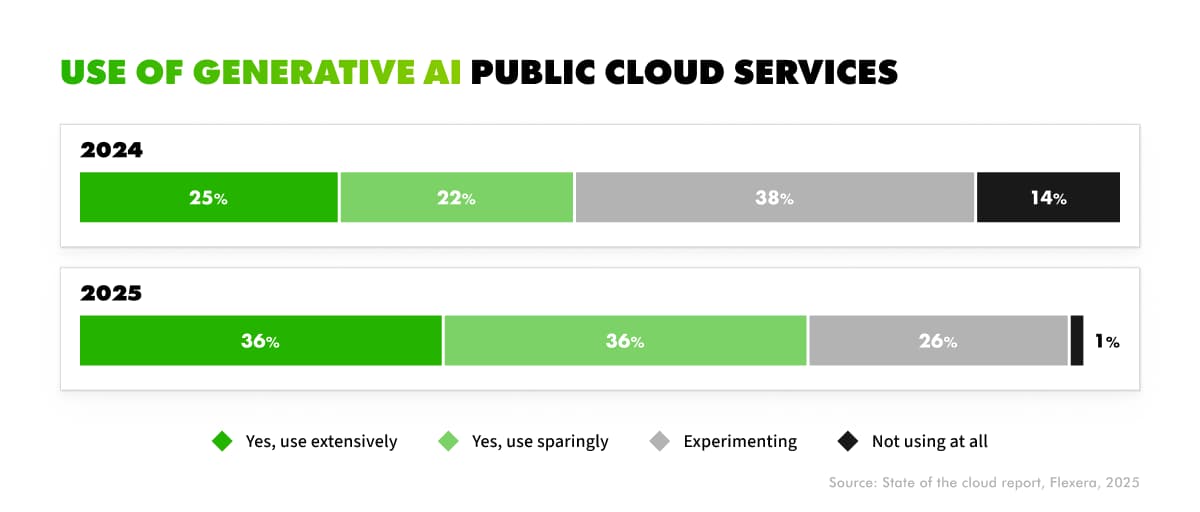
Use of generative AI public cloud services increased from 47% in 2024 to 72% in 2025, showing how quickly AI workloads are becoming part of enterprise cloud planning. (Source: Fl)
These numbers point to the same issue: as more workloads move to cloud and AI usage grows, cloud decisions become more expensive to reverse. A workload placed without a portability plan can turn into a long-term constraint.
Good multi-cloud planning gives enterprises more control over those decisions. It helps teams decide which workloads need portability, which data needs location control, which systems need resilience, and which services can safely depend on a specific provider.
Vendor Lock-In Becomes More Expensive When AI Workloads Scale
Cloud vendor lock-in has always been part of cloud strategy. But AI makes the issue more expensive and harder to unwind.
In traditional cloud environments, lock-in may come from proprietary databases, storage services, identity systems, deployment patterns, or monitoring tools. With AI, the dependency can go deeper. A company may become tied to one provider’s model APIs, vector databases, data pipelines, GPU availability, prompt management tools, orchestration services, or AI governance workflows.
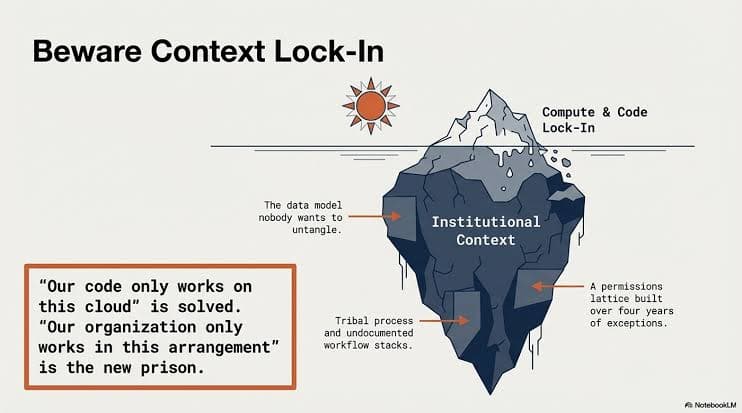
Vendor lock-in can go beyond compute and code. As AI workloads scale, dependencies may also form around data models, workflow logic, permissions, and institutional context. (Source: NotebookLM)
At small scale, this may feel manageable. A team builds quickly, ships a pilot, and proves a use case. The problem appears later, when that pilot becomes part of production operations.
If inference cost rises, can the workload move?
If data residency rules change, can the architecture adapt?
If a provider limits capacity, does the business have another path?
If the company wants to use a different model, will the surrounding system support it?
These questions are especially important for AI because the model is only one part of the system. Around it, enterprises need data access, retrieval pipelines, application integrations, security policies, monitoring, approvals, and user-facing workflows.
A systematic mapping study on containerization in multi-cloud environments found that containerization supports workload portability and resource optimization, while common research themes include scalability, high availability, performance, optimization, security, privacy, monitoring, and adaptation.
That does not mean containers solve every lock-in problem. It means portability needs to be designed into the architecture early. If workload packaging, data access, integration logic, observability, and security controls are too tightly bound to one provider, moving later becomes slow and expensive.
For AI workloads, that risk grows as usage scales.
Multi-Cloud Without Architecture Can Create More Complexity
Multi-cloud is useful only when the architecture is clear. Without that foundation, using more providers can create more operational friction.
Each cloud has its own identity model, pricing structure, networking rules, deployment patterns, logging tools, security services, and operational language. If teams add providers without a shared architecture, they may end up with duplicated pipelines, inconsistent monitoring, fragmented security controls, and cloud bills that are harder to explain.
The result is not resilience. It is another layer of complexity.
This is where enterprises need to be careful. Multi-cloud should reduce strategic risk, not multiply operational noise. A good architecture defines how applications connect, how data moves, how workloads are deployed, how systems are monitored, and how teams control cost across environments.
This is also where Twendee’s role becomes practical. Instead of treating multi-cloud as a provider selection exercise, Twendee designs cloud architectures around workload behavior, business requirements, data flow, integration needs, security controls, and long-term scalability. For enterprises running applications across cloud and on-premise environments, the architecture needs to reflect how the business actually operates.
A company may need ERP data to connect with CRM, analytics, internal applications, and AI services. It may need some workloads to stay near sensitive data while other services scale in the public cloud. It may need APIs, integration layers, monitoring, and access controls that work across environments.
The value of multi-cloud comes from that coordination. Provider choice matters, but the architecture behind the choice matters more.
What a Practical Multi-Cloud Strategy Should Define
A strong multi-cloud strategy starts with workload clarity.
Enterprises should classify workloads by business importance, data sensitivity, cost profile, performance needs, resilience requirements, and portability value. Some workloads can stay tightly coupled to one provider. Others need a more flexible design because they are expensive, business-critical, compliance-sensitive, or likely to change over time.
A practical strategy should define seven things.
Workload placement. The company needs to know which workloads belong on public cloud, private infrastructure, specialized AI infrastructure, or on-premise systems.
Data location. AI and analytics workloads depend on data, but that data may have privacy, residency, latency, or governance requirements.
Portability standards. Teams need to decide where containers, Kubernetes, APIs, abstraction layers, or deployment standards make sense.
Integration architecture. Applications, data pipelines, ERP, CRM, finance systems, and AI services need a reliable way to communicate across environments.
Cost governance. Multi-cloud without FinOps discipline can hide spending instead of controlling it.
Resilience planning. Enterprises need to know which systems require failover, redundancy, backup, or regional distribution.
Security and compliance controls. Identity, access, logging, encryption, audit trails, and policy enforcement must work across cloud boundaries.
This is the difference between using multiple clouds and having a multi-cloud strategy. One is a procurement outcome. The other is an architecture discipline.
Conclusion
AI infrastructure growth is bringing multi-cloud strategy back into enterprise planning because the stakes of cloud decisions are getting higher. Workloads are becoming more compute-intensive. Data location matters more. Pricing can shift quickly. Resilience and portability are harder to ignore.
But multi-cloud only creates value when it is designed around real workload needs. Enterprises do not need to spread every system across every provider. They need to understand which workloads require flexibility, which data must stay controlled, which integrations must remain stable, and which architecture choices could become constraints later.
For enterprises planning cloud and AI infrastructure together, Twendee helps design architectures that connect applications across cloud and on-premise environments while keeping the system flexible enough for future AI workloads.
Book a call: Calendly
Read latest blog: Vendor Management Gets Messy When Supplier Data Lives Everywhere